What is HunyuanVideo 1.5: Consumer-GPU-Friendly Breakthrough in AI Video Generation
Until recently, high-quality AI video generation required expensive hardware, multi-GPU clusters, or cloud-only commercial solutions. But now, HunyuanVideo 1.5 is changing the landscape.
HunyuanVideo 1.5 is a lightweight, open-source, high-performance video generation model developed by Tencent, supporting:
Text-to-Video
Image-to-Video
1080p video enhancement
Chinese + English native prompt understanding
Key Advantages
Lightweight + Consumer GPU Compatibility
Runs on ~14GB VRAM GPUs
Optimized inference acceleration
Suitable for laptops, gaming PCs, and personal workstations
Strong Instruction Following
Complex semantic reasoning
Continuous cinematography
Action chaining
Realistic scene-embedded text rendering
Fluid Motion, Physics-Based Realism
No distortion, natural motion
Realistic soft and rigid body behavior
Works with fast-motion action scenes
Cinematic Aesthetic and Shot Language
Cinematic depth of field
Realistic lighting and shadows
Film-grade texture and tone
Multi-Style & High Consistency
Realistic: Lifelike textures and natural lighting for highly believable characters and environments.
Anime: Clean linework and consistent color tones, perfect for animated storytelling.
Retro / Film: Nostalgic visual effects such as VHS artifacts, film grain, and vintage color grading, maintaining overall style consistency.
Even after edits, identity and style remain consistent across frames.
Technical Foundation
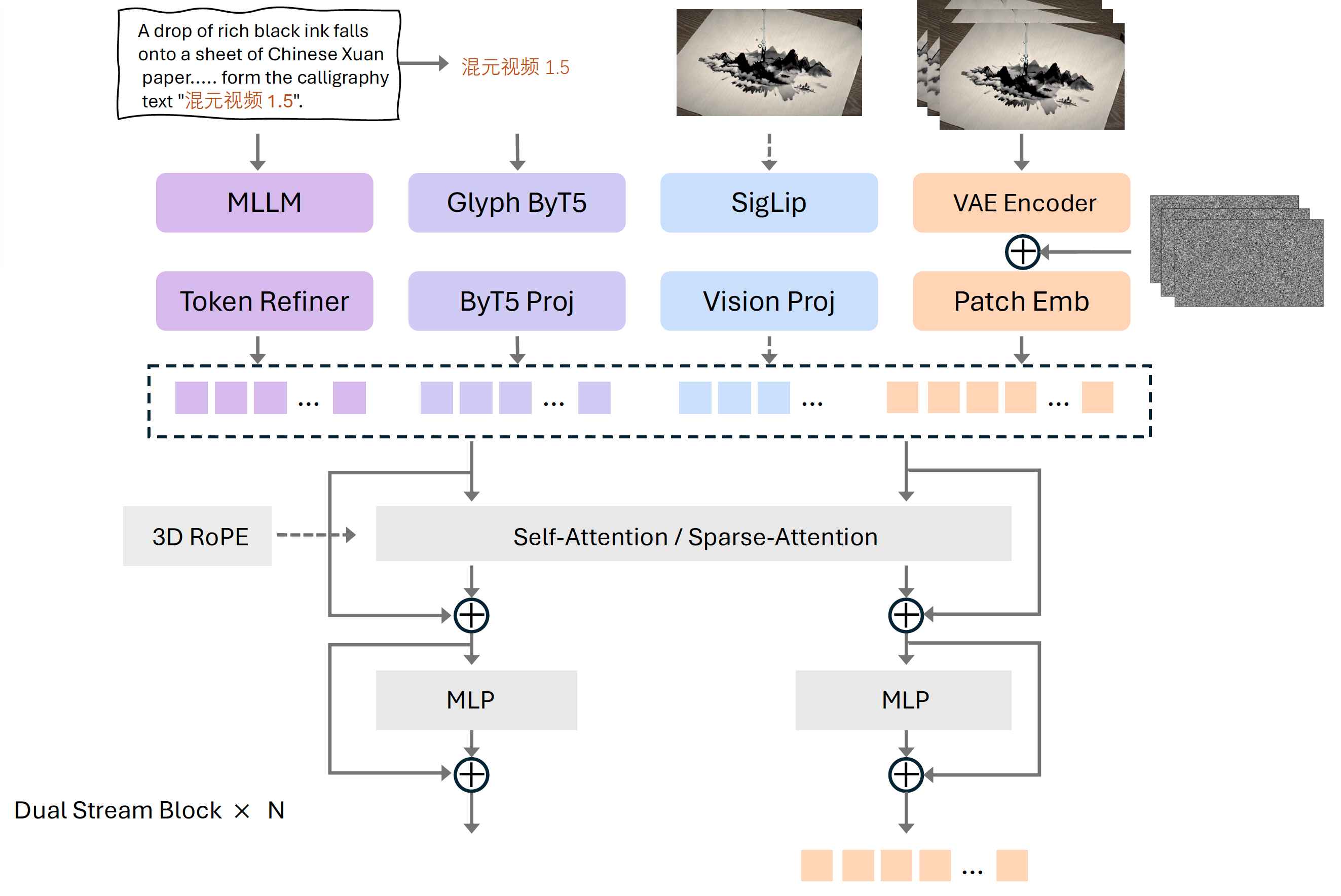
Lightweight High-Performance Architecture
Lightweight Architecture:
Built with an 8.3B-parameter Diffusion Transformer (DiT) design, optimized for efficient performance on consumer-level GPUs.
Efficient Compression:
Uses a 3D causal VAE to achieve 16× spatial and 4× temporal compression, enabling high-quality output with minimal computational load.
Faster Inference:
Introduces Selective Sliding Sparse Attention (SSTA) to remove redundant spatiotemporal data, significantly reducing computation for long-sequence video generation.
Strong Instruction Understanding:
Combines enhanced multimodal understanding with a dedicated text encoder to accurately interpret both Chinese and English prompts.
High-Fidelity Output:
Supports precise text rendering and delivers high-quality text-to-video and image-to-video generation with strong instruction alignment and realism.
Video Super-Resolution Enhancement
1080p Upscaling:
Supports efficient upsampling of low-resolution video outputs to full HD (1080p) quality.
Latent Space Processing:
Performs super-resolution in the latent space using a specially trained upsampling module rather than traditional interpolation.
Artifact Prevention:
Avoids grid artifacts and texture inconsistencies that typically occur with standard resizing methods.
Quality Enhancement:
Improves image sharpness, restores details, and corrects distortions for a visibly cleaner and more refined result.
Significant Visual Upgrade:
Delivers higher clarity, improved texture realism, and overall enhanced video fidelity.
Full-Chain Training Optimization
Progressive Multi-Stage Training:
Covers the entire pipeline from pretraining to post-training for robust model learning.
Accelerated Convergence:
Utilizes the Moun optimizer to speed up training efficiency.
Motion Continuity Optimization:
Enhances temporal consistency across frames for smooth, natural video motion.
Cinematic Aesthetics:
Refines composition, lighting, and visual style to achieve high-quality, film-like results.
Human Preference Alignment:
Aligns generated content with human aesthetic and perceptual preferences for professional-grade output.
Inference Acceleration
Model Distillation:
Compresses knowledge from larger models to improve runtime efficiency without sacrificing output quality.
Cache Optimization:
Reuses intermediate computations to reduce redundant processing and accelerate inference.
Enhanced Efficiency:
Achieves faster video generation with lower memory and computational requirements.
Consumer-Friendly:
Optimized to run efficiently on standard GPUs, making high-quality AI video generation more accessible.
How to Use HunyuanVideo 1.5
1. Image-to-Video
Upload a reference image in JPG, PNG, or WebP format.
Enter a text prompt describing the video content.
Select the desired output resolution.
Generate a video of up to 10 seconds.
2. Text-to-Video
Enter a text prompt describing the desired scene.
Optionally provide negative prompts to exclude unwanted elements.
Choose the video resolution.
Generate a video of up to 10 seconds.
Both modes allow users to create high-quality, style-consistent, AI-generated videos with precise control over content, aesthetics, and composition.
Use Cases of HunyuanVideo 1.5
Independent Content Creation / YouTubers:
Generate cinematic-quality videos locally without expensive cloud resources.
Game Development:
Quickly produce character animations, environmental visuals, and in-game cinematic sequences.
Film Pre-Visualization:
Accelerate storyboarding, scene prototyping, and concept visualization.
Marketing & Branding:
Create dynamic promotional videos, advertisements, and social media content.
Education & Research:
Support AI video experiments, teaching demonstrations, and creative projects on consumer-level hardware.
Industry Impact of HunyuanVideo 1.5
HunyuanVideo 1.5 lowers barriers to AI filmmaking, meaning:
AI-assisted content creation will move from studios → individuals
Education + small businesses can join AI video production early
Open-source ecosystems will accelerate innovation
It represents a shift from exclusive cinematic AI to accessible creative tools.
HunyuanVideo 1.5 isn’t just another model, it’s a turning point.
Whether you're building the next AI film studio or simply exploring video AI, HunyuanVideo 1.5 makes cinematic-quality AI video creation accessible.
Reference: